

Description
Download Arduino Create – Chrome Apps, Arduino, coding, electronics
Overview
Arduino Create is a cloud-based development platform designed to simplify the process of programming and managing Arduino projects. Built specifically for users interested in electronics and embedded systems, it enables real-time coding, project sharing, and direct board communication through a web browser. The software is accessible from any device with a modern browser and an internet connection, making it ideal for students, hobbyists, and educators who value flexibility and collaboration.
It eliminates the need for local software installation by hosting the entire development environment online. Users can write code, test sketches, and upload them directly to Arduino boards connected via USB, all without requiring complex setup. The platform supports a wide range of Arduino boards, ensuring compatibility with both common and newer models. Projects are stored in the cloud, allowing users to access and edit them from any location.
With Arduino Create, the workflow from idea to implementation becomes seamless. From initial inspiration to final deployment, users can manage every stage of their project from a single dashboard. A free Arduino account is required to begin, which also enables access to community tutorials, shared libraries, and project templates. This makes it particularly useful for learning environments and collaborative teams.
Key Features & Capabilities
- Cloud-Based Web Editor – Write, edit, and compile code directly in the browser. No installation required. Ideal for quick prototyping and remote work.
- Automatic Library Integration – All commonly used Arduino libraries are pre-installed and accessible without manual configuration.
- Direct Board Upload – Upload sketches to connected Arduino boards instantly via USB, supporting plug-and-play functionality.
- Multi-Platform Access – Works on Windows, Mac, Linux, and Chrome OS, ensuring broad compatibility across devices.
- Project Sharing & Collaboration – Share projects with others through unique links, enabling team-based development and peer feedback.
- Integrated Tutorials and Templates – Access step-by-step guides and ready-to-use project templates to accelerate learning and development.
These features streamline the development process, especially for beginners. For example, a student can start a project on a school Chromebook, continue working at home on a Windows PC, and collaborate with peers using shared links. The automatic inclusion of libraries reduces setup time and prevents common configuration errors. The web editor’s responsiveness ensures a smooth coding experience, even on lower-end devices.
User Interface, Workflow & Performance
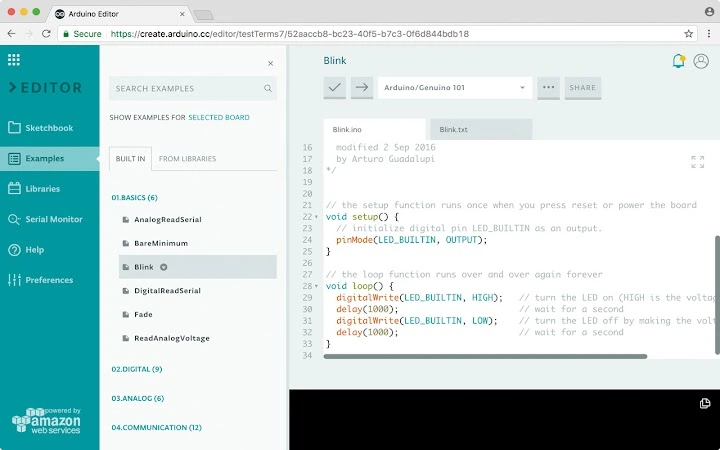
The user interface of Arduino Create is clean and minimalistic, centered around a responsive web dashboard. The layout is intuitive, with clearly labeled sections for code editing, board selection, file management, and project sharing. Navigation is straightforward, relying on a sidebar menu and top navigation bar for quick access to different functions.
Workflow efficiency is enhanced by the platform’s seamless integration between coding, testing, and deployment. After writing code, users can immediately compile and upload to a connected board with a single click. The editor supports syntax highlighting, auto-completion, and real-time error detection, improving code accuracy and reducing debugging time.
Performance details were not specified by the developer. However, as a web-based application, its responsiveness depends on internet speed and browser performance. The application is lightweight, with a reported size of 1.5 MB, suggesting minimal impact on system resources. Stability is expected to be consistent due to cloud hosting, but actual behavior may vary based on network conditions and browser compatibility.
Compatibility & System Requirements
Arduino Create is compatible with Windows, Mac, Linux, and Chrome OS, making it one of the most accessible development tools for cross-platform users. It runs entirely in a web browser, so no native installation is required. The software does not rely on specific hardware configurations, as processing is handled remotely.
Installation size is listed as 1.5 MB, which reflects the minimal footprint of the web app’s interface and client-side components. The developer did not specify additional system requirements such as RAM, CPU, or browser versions. Compatibility information is limited to the operating systems listed.
Users should ensure their device has a stable internet connection and a modern browser such as Chrome, Firefox, or Safari. For Chromebook users, the platform is specifically optimized, with dedicated support documented in the official help center.
Pros and Cons
Pros
- Accessible from any device with a browser and internet connection
- Zero installation required – works immediately after login
- Automatic library inclusion reduces setup complexity
- Real-time collaboration and project sharing capabilities
- Supports a wide range of Arduino boards with plug-and-play functionality
- Cloud storage ensures project safety and accessibility
Cons
- Requires a stable internet connection for full functionality
- Dependent on browser performance and network speed
- No offline coding mode available
- Limited customization options compared to desktop IDEs
- Requires an Arduino account to use
FAQ Section
Is Arduino Create free to use?
Yes, Arduino Create is available at no cost. It includes access to the web editor, cloud storage, tutorials, and basic project sharing features.
Which devices can I use Arduino Create on?
Arduino Create works on Windows, Mac, Linux, and Chrome OS devices. It is optimized for Chromebooks and can be used on any device with a modern web browser.
Do I need to install anything to use it?
No installation is required. The software runs entirely in your web browser. You only need to sign in with your Arduino account to get started.
Can I use Arduino Create offline?
Currently, Arduino Create requires an active internet connection. There is no offline mode available for coding or uploading sketches.
What kind of Arduino boards are supported?
Arduino Create supports a wide range of Arduino boards, including popular models like Uno, Nano, Mega, and newer additions. For the most up-to-date list, refer to the official documentation.
Final Thoughts + CTA
Arduino Create stands out as a modern, accessible solution for anyone exploring electronics and embedded programming. Its cloud-based nature, combined with automatic library handling and seamless board integration, makes it ideal for beginners, educators, and collaborative teams. While it relies on internet connectivity, its cross-platform compatibility and ease of use offer significant advantages over traditional desktop IDEs.
For users who value flexibility, real-time collaboration, and a streamlined workflow, Arduino Create delivers a robust experience without the burden of local setup. The platform bridges the gap between inspiration and implementation, allowing users to focus on creativity rather than configuration.
Download Arduino Create now to begin building, sharing, and innovating with Arduino electronics from any device, anytime.
Guides & Tutorials for Arduino Create for Education App for Chrome
How to install Arduino Create for Education App for Chrome
- Click the Preview / Download button above.
- Once redirected, accept the terms and click Install.
- Wait for the Arduino Create for Education App for Chrome download to finish on your device.
How to use Arduino Create for Education App for Chrome
This software is primarily used for its core features described above. Open the app after installation to explore its capabilities.
User Reviews for Arduino Create for Education App for Chrome 0
No reviews found





